
When selling to Fortune 500 companies, government agencies, or large university systems, you will often hear the term Supplier Enablement.
To these organizations, winning a supplier contract is only the first step. Before they can send you a single dollar, they must “enable” you in their system. This means connecting your business to their digital procurement supply chain.
For suppliers, this enablement process can make or break a commercial partnership. Let’s look at what supplier enablement involves and how to prepare your business to become an enterprise-ready vendor.
What is Supplier Enablement?
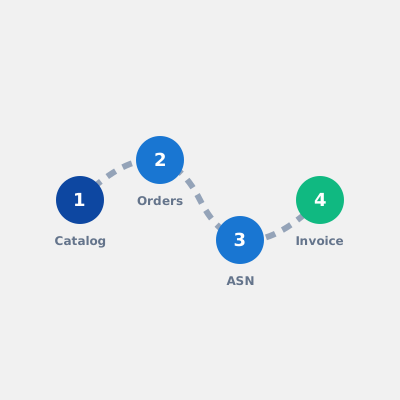
Supplier enablement is the process of connecting a supplier to a buyer’s procurement system so the two can exchange catalogs, purchase orders, shipping notices and invoices electronically instead of by email, PDF and re-keying.
The buyer runs it, usually through a dedicated enablement team, and the supplier does most of the work. The buyer’s procurement platform (SAP Ariba, Coupa, Oracle or JAGGAER) is linked either directly to the supplier’s systems or to a supplier network the supplier joins.
Supplier enablement vs onboarding vs activation
The terms get used interchangeably, and it is worth knowing which one a buyer means:
- Supplier onboarding is commercial and legal: vendor master data, bank details, tax forms, insurance, compliance checks. It makes you a supplier the buyer is allowed to pay.
- Supplier enablement is technical: catalog, PO, ASN and invoice connections. It makes you a supplier the buyer can transact with through their system.
- Supplier activation (sometimes “vendor enablement”) usually describes the buyer’s side of the same programme: the campaign that gets a list of suppliers registered and transacting on the network.
A supplier can be fully onboarded and still not enabled, which is exactly when the “you need to be on our system by…” letter arrives.
The supplier enablement process, step by step
Whatever the platform, enablement follows roughly the same sequence:
- The requirement arrives. A letter or email from the buyer’s procurement or enablement team naming the platform, the documents they expect, and a deadline.
- Scoping. Agree in writing which documents are in scope (catalog only, or PO, ASN and invoice as well), which protocol (cXML, OCI or EDI), and whether the catalog is PunchOut or hosted.
- Network registration. Create or upgrade your account on the buyer’s network, such as Ariba Network or the Coupa Supplier Portal, and accept the buyer’s trading relationship.
- Catalog and data preparation. Classification codes (usually UNSPSC), standard units of measure, contract prices and SKUs, in the format the buyer validates against.
- Build and configure the connection. A PunchOut endpoint, PO receipt, and the return documents, plus credentials exchanged with the buyer.
- Testing. Test transactions in the buyer’s test environment until catalog, cart return, order and invoice all pass. This stage is the one outside your control, and it is where most of the calendar goes.
- Go-live and upkeep. The buyer approves the connection in production. After that, prices, products and certificates need keeping current, and platform changes need handling.
The realistic timeline is two to four weeks of supplier-side work, and then anywhere from one week to three months depending on how quickly the buyer’s team tests.
The 4 Key Pillars of Supplier Enablement
A comprehensive supplier enablement program usually covers four technical capabilities:
1. Catalog Integration
Buyers need to view your products and prices. Enablement teams will ask for either a static catalog file (like a CIF - Catalog Interchange Format CSV file) or a dynamic PunchOut Catalog.
- PunchOut is highly preferred for dynamic inventory, complex configurations, or volatile pricing.
2. Purchase Order (PO) Delivery
Once a buyer approves a requisition, the PO must be routed to you. The enablement team will configure whether this PO is sent via:
- Electronic data files (cXML / EDI).
- Supplier Portals (e.g., Ariba Network, Coupa Supplier Portal).
- E-mail (PDF attachment).
3. Advanced Shipping Notices (ASN)
For physical products, buyers require electronic shipping notifications to prepare their receiving docks. This involves transmitting tracking details and packing structures before the truck arrives.
4. Electronic Invoicing (E-Invoicing)
Instead of processing paper invoices, buyers want them sent as data documents. This allows their systems to run automated matching and release payment without manual processing.
How to Prepare for Supplier Enablement (Your Checklist)
To ensure a fast, successful onboarding experience, suppliers should have the following details prepared:
- Identify Your Protocol Capabilities: Know whether your web store and ERP support standard protocols (cXML, OCI, EDI, API).
- Organize Product Data: Ensure all items in your catalog have correct UNSPSC Codes, standard Units of Measure (UOM), and unique SKUs.
- Determine Your Network IDs: Register on the major supplier networks (Ariba Network, Coupa, etc.) and have your IDs (like ANIDs) ready.
- Select an Integration Partner: Building separate software integrations for every new customer is unsustainable. Partner with an enablement middleware provider to streamline the process.
Why Speed of Enablement Matters
The time it takes to go from contract signature to the first transaction is known as Time-to-Value.
If your enablement process takes six months due to technical bugs, security failures, or communication delays, the buyer will get frustrated. They may even turn to a competitor who is already “enabled” on their network.
Conversely, a supplier who has the data ready and answers test failures the same day makes the buyer’s enablement team’s job easy, and tends to be first in the queue when the next category is enabled.
Become Enterprise-Ready with QuickPunchOut
At QuickPunchOut, we specialize in making suppliers enterprise-ready.
We act as your technical supplier enablement team. We build the connection of your catalog, purchase orders, shipping notices and invoicing to your buyer’s procurement platform, work through the buyer’s test cycles with you, and run the connection once it is live. The monthly fee starts the day it goes live, not at signature.
Get enabled today. See what a full catalogue build involves.